
Takeuchi Dashboard Warning Lights and Symbols Explained
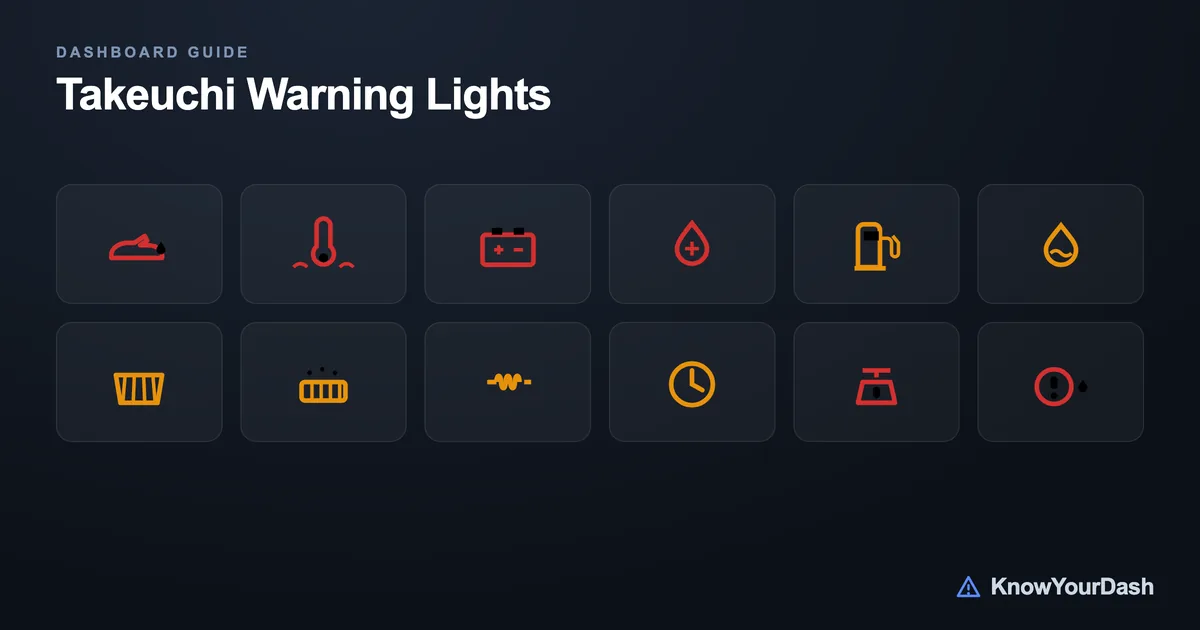
Takeuchi compact excavators and track loaders use a color-coded instrument cluster to tell you exactly how urgent a problem is. Red lights mean stop the machine immediately and investigate. Amber lights mean something needs attention soon, but you can usually finish the current task. Green or blue lights are informational.
This guide covers the TB-series compact excavators (TB216, TB235, TB240, TB260, TB285, TB290) and TL-series compact track loaders (TL8, TL10, TL12). The warning symbols are largely the same across all these models, but always cross-reference your operator's manual for model-specific procedures - especially before operating in high-load or high-temperature conditions.
How the Takeuchi instrument cluster works
When you turn the key to the ON position, every warning light on the cluster illuminates for a few seconds. This is the self-check (bulb test) - it confirms all indicator lamps are working. The battery charge light and engine oil pressure light stay on until the engine fires and oil pressure builds. If either of those stays on after startup, shut down immediately.
The cluster on TB and TL series machines typically includes a combination of dedicated lamp indicators (individual bulbs with a symbol) and, on newer models, a small LCD information display for hours and fault codes. The lamp indicators are what matter for day-to-day operation - each one has a specific meaning tied to a sensor threshold.
Takeuchi groups their warning strategy into two clear tiers: stop-immediately (red) and service-soon (amber). There is no 'ignore it for a while' category on these machines. If a light comes on and you are uncertain which tier it belongs to, stop work and check.
Takeuchi warning lights: full symbol reference
The table below covers every standard warning indicator found on TB and TL series machines. Amber symbols marked 'service soon' still need attention within one working day, not weeks later.
Engine Oil Pressure
Engine oil pressure has dropped below a safe level
What to do: Stop the machine immediately, shut off the engine. Check oil level before restarting. Do not run the engine - low oil pressure causes rapid bearing damage
Coolant Temperature High
Engine coolant temperature has exceeded the safe operating range
What to do: Stop work, idle the engine for 30-60 seconds, then shut down. Check coolant level, inspect the radiator for blockage (debris common on excavators), and check the cooling fan belt
Battery / Charging System
Alternator is not charging the battery or voltage has dropped critically
What to do: Finish the current cycle, then shut down and inspect the alternator belt and wiring connections. Running on battery alone will eventually stall the machine
Hydraulic Oil Temperature
Hydraulic fluid temperature is elevated - approaching the upper limit
What to do: Reduce load and cycle the boom and arm slowly with no load for several minutes to circulate and cool the fluid. If the light stays on, stop and check the hydraulic oil level and cooler for debris blockage
Fuel Level Low
Fuel tank is at or near empty
What to do: Refuel as soon as possible. Running diesel engines out of fuel introduces air into the fuel system and requires bleeding the system before restart - a time-consuming process
Water in Fuel Separator
Water has accumulated in the fuel-water separator bowl
What to do: Do not continue operating - water in diesel fuel can damage injectors. Drain the separator bowl per the operator manual before the next start. This is a regular maintenance task, not a failure
Air Filter Restriction
The primary air filter element is clogged and restricting airflow to the engine
What to do: Clean or replace the air filter element at the end of the shift. On excavators, the air filter is a wear item in dusty or dirty conditions - check it daily during high-debris work
DPF Regeneration Required
The diesel particulate filter is loading up and needs a regeneration cycle to burn off accumulated soot
What to do: On models with manual regen (TB260, TB285, TB290 with Tier 4 Final engines): park the machine on level ground away from combustibles and initiate a parked regeneration. Passive regen happens automatically during normal high-load operation
Glow Plug / Preheat
Glow plugs are preheating the combustion chambers for cold-weather starting
What to do: Wait for this light to go out before cranking the engine. Cranking while the preheat cycle is running reduces starting effectiveness and can shorten glow plug life
Engine Oil Temperature High
Engine oil has reached an elevated temperature, above the normal operating range
What to do: Reduce load, allow the engine to idle. If the light does not clear within a few minutes, shut down and check the oil level and cooling system
Service / Maintenance Interval
The machine has reached a scheduled maintenance interval based on operating hours
What to do: Schedule service per the Takeuchi maintenance schedule (first service at 50 hours on new machines, then every 250 hours for standard items). The light resets after service is logged
Overload / Lift Capacity Warning
The load on the attachment or lift arm is approaching or exceeding rated capacity
What to do: Lower the load immediately. Reduce the lift load or shorten the working radius. Operating near or over rated capacity stresses structural components and voids warranty coverage
Hydraulic System Fault
A hydraulic system fault has been detected - often low hydraulic oil level or a pressure circuit fault
What to do: Stop the machine and check hydraulic fluid level first. If level is good, do not continue operating - a pressure fault can indicate a pump, valve, or line issue that needs diagnosis
Fuel Filter Restriction
The fuel filter is clogged and restricting fuel flow to the injection system
What to do: Replace the fuel filter at the end of the shift. On Takeuchi TB series machines, the fuel filter is a standard 250-hour maintenance item. A severely clogged filter can cause hard starts and rough running
Red versus amber: how to decide what to do in the field
Takeuchi's color system is straightforward, but the right response in the middle of a job is worth knowing in advance.
Any red light: stop the machine within the next few seconds. Finish the current swing or move to safe ground, then cut the throttle and investigate before restarting. The three red lights - oil pressure, coolant temperature, and charging system - all point to conditions that cause permanent engine or component damage within minutes. There is no safe 'just finish this cycle' option with a red light on.
Amber lights: finish the task, then attend to it. Most amber lights indicate a developing condition that needs service before the next shift, not an emergency mid-task shutdown. The exception is the hydraulic system amber - if it comes with a noticeable performance drop (sluggish boom, slow swing), treat it as more urgent.
The water-in-fuel light is the one amber indicator that catches newer operators off guard. It looks like a maintenance reminder, but ignoring it and refilling without draining the bowl allows water contamination to migrate into the high-pressure injection system - a far more expensive repair than a five-minute bowl drain.
For comparison with other compact equipment in the same class, see the guide to Case skid steer warning lights and the overview of JCB loader dashboard warning lights - the red/amber color logic is consistent across most compact construction equipment brands.
Startup bulb check and normal operating lights
Every Takeuchi TB and TL series machine runs a lamp check when you cycle the key to ON. All warning indicators illuminate for approximately 2-3 seconds, then go out. This is by design and does not indicate a fault. The two lights that stay on slightly longer are the battery charge light and the engine oil pressure light - both should extinguish within 2-4 seconds after the engine starts and oil pressure builds.
If the oil pressure light stays on after engine startup, do not run the machine. Shut down, check the dipstick, and look under the machine for signs of a leak. Low oil at startup is the most common cause; a seized or failing oil pump is rarer but possible on high-hour machines.
Normal green or blue indicator lights you may see during operation include the work lights indicator (blue lamp icon when lights are on) and the glow plug indicator at cold startup. These are status indicators, not warnings.
Common Takeuchi warning light problems and their fixes
Hydraulic oil temp warning on a new machine: Almost always caused by heavy continuous work without allowing the hydraulic system to warm up properly in cold weather. Takeuchi recommends warming the hydraulic system by cycling the boom and arm slowly for 5-10 minutes before beginning full-load work in temperatures below 14 F (-10 C).
Air filter light coming on repeatedly: Check the environment you're working in. On demolition or land-clearing sites, the filter can load up within a single shift. Some operators go to a two-element setup or bump up to daily filter inspection. The Takeuchi pre-cleaner on most TB models catches large particles before the main element, but it needs to be emptied regularly too.
DPF regeneration light on Tier 4 Final machines (TB260, TB285, TB290): These machines need regular high-load operation to run passive regen automatically. If the machine spends most of its time at low throttle doing light work, soot builds up and triggers the manual regen light. Operators who do a lot of idle-heavy work (spotting, slow backfilling) may need to run a parked regen every 8-12 operating hours.
Battery light at the end of a long idle period: Takeuchi diesel engines at low idle do not always charge the battery fully, especially with all electrical accessories on. If you leave the machine idling for extended periods with the cab lights and display on, the battery light may flicker on at very low RPM. Running at working RPM resolves this; persistent charging issues point to the alternator or belt tension.
For a broader look at how warning systems compare across compact equipment brands, the guide on forklift dashboard warning lights covers the common symbols that appear across most brands in this category, and Linde forklift warning lights provides a detailed look at a comparable European make.
Common questions
Why do all my Takeuchi warning lights come on when I start the machine?
That's the bulb check - a normal self-test that illuminates every indicator for 2-3 seconds to confirm all lamps are working. All lights should go out within a few seconds of starting the engine. If any remain on after startup, that specific system has a fault and needs attention.
Can I continue operating if the hydraulic oil temperature light comes on?
Briefly, yes. Reduce the load and cycle the attachment slowly with no load for a few minutes to help the hydraulic fluid cool. If the light clears, you can continue at a reduced work pace. If it stays on or the machine feels sluggish, stop and check the hydraulic oil level and the cooler for dirt or debris blockage.
What does it mean when the Takeuchi oil pressure light stays on after startup?
This is a serious warning. Shut the engine off immediately. The most common cause is low oil level - check the dipstick before doing anything else. If oil level is fine, the pump or pressure sending unit may be at fault. Do not run the engine with the oil pressure light on.
How often does the service indicator light come on?
The initial service interval on new Takeuchi machines is 50 hours (first oil change and inspection). After that, the service light typically triggers every 250 hours for standard fluid and filter service. Your operator manual has the full maintenance schedule with intervals for hydraulic oil, engine oil, fuel filter, and other items.
What happens if I ignore the water-in-fuel separator light?
Water travels downstream into the high-pressure fuel injection system, where it causes rapid injector and fuel pump wear. Injector replacements on a Takeuchi TB series machine are expensive - far more so than a routine separator drain. This light needs action before the next start, not at the next service interval.
Does the DPF regen light mean I have to stop work immediately?
Not immediately. The DPF regen light means you should plan a parked regeneration within the shift - ideally in the next hour or two. If you ignore it and keep running, you will eventually get a more urgent warning (red or flashing amber on some models) that requires an immediate stop for regen. Parked regen takes 20-40 minutes and must be done on level, open ground away from flammable materials.