
Understanding John Deere Tractor Dashboard Symbols
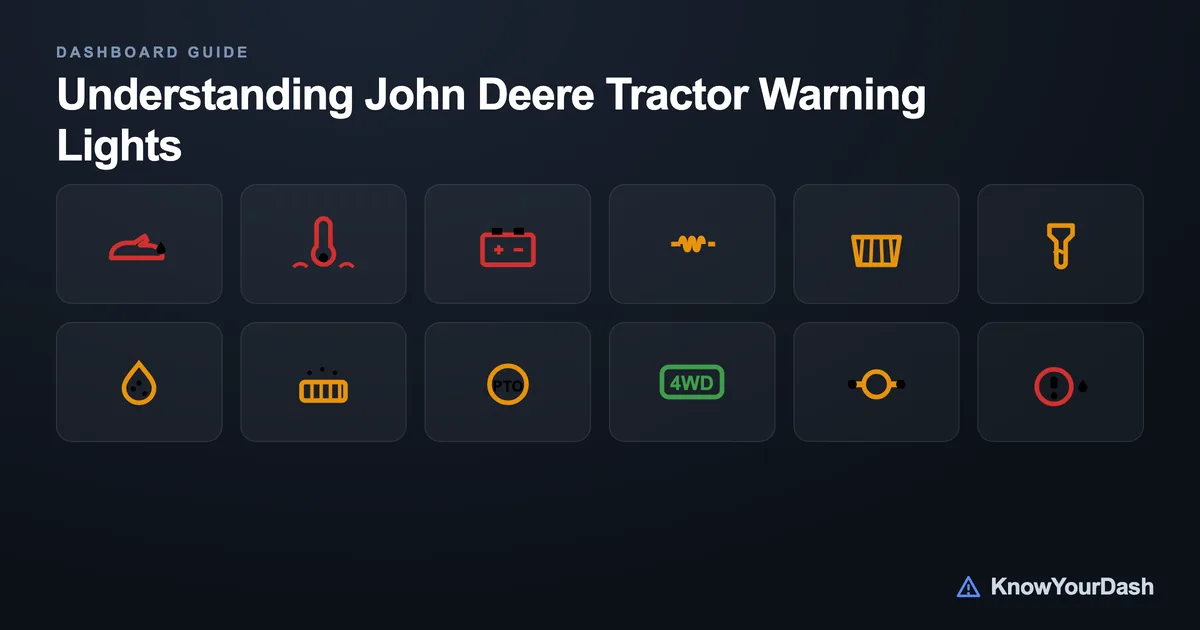
John Deere tractor dashboard symbols follow a clear three-color system: red means stop the engine right now, amber means address the issue soon, and green or blue simply confirms a system is active. Learning these colors is the fastest way to react correctly in the field.
Dashboard layouts vary across the 5E, 6M, and 7R series, but the core symbols and their colors are consistent. This guide covers the most common indicators you will see, what each one means, and the right response.
How John Deere Colors Its Warning Lights
Every indicator on a John Deere dash belongs to one of three tiers. Red is the top tier - the instrument cluster may also flash a red 'STOP' lamp to reinforce urgency. Shut the engine down safely as soon as you can. Amber (sometimes yellow or orange) signals a developing problem or a maintenance reminder. You usually have time to finish the row and park the machine, but do not ignore it across multiple shifts. Green and blue are informational; they confirm an operator-activated system is running as expected.
On cab-equipped tractors (6M, 7R, 8R), the instrument cluster groups red indicators on the left side and amber indicators on the right. Older open-station models - the 5E series, for example - use fewer lights but follow the same color logic. If your tractor has a CommandCenter display, fault codes appear as text alongside the lamp to help you identify the exact circuit.
Red Warning Symbols - Stop the Engine
These are the lights you never want to see while working. Each one signals a failure that can cause irreversible engine or drivetrain damage within minutes if you keep running. Pull the tractor to a safe spot, shut down, and investigate before restarting. For more context on dashboard warning systems in general, see tractor dashboard symbols and meanings.
Engine Oil Pressure
Oil pressure has dropped to a critically low level; the engine bearings are at risk of damage within seconds
What to do: Stop the engine immediately. Check the oil level with the dipstick. Do not restart until the cause is found - low level, failed pump, or blocked pickup
Coolant Temperature High
Engine coolant is overheating, which risks warped cylinder heads and blown head gaskets
What to do: Shut down safely, let the engine cool before opening the cap. Check coolant level, radiator screen for debris, and fan belt tension
Hydraulic Oil Temperature
Hydraulic system fluid is running too hot; seal damage and pump failure can follow quickly
What to do: Lower all implements to the ground, shut down, and allow the fluid to cool. Check the hydraulic oil level and look for a clogged oil cooler
Stop Lamp (Master Warning)
A critical fault has been detected in one or more major systems; the cluster triggers this lamp to demand immediate action
What to do: Stop the engine now. Note which secondary lamp is also lit to identify the affected system. Do not restart without diagnosing the fault
Battery / Charging System
The alternator is not charging the battery; electrical systems will begin failing as battery voltage drops
What to do: Finish the current operation if safe, then shut down. Inspect the alternator belt, connections, and the alternator itself before the next start
Amber Warning Symbols - Attend to These Soon
Amber lights on a John Deere are serious but not immediately catastrophic. You typically have time to complete a pass and park before investigating. However, running for days or weeks with an amber light is asking for a red-light emergency down the road. If you are unsure which amber system has triggered, check whether the John Deere indicator light codes displayed on your CommandCenter point to a specific fault code.
Glow Plug / Preheat
The glow plugs are heating the combustion chambers before a cold start; wait for this light to go out before cranking
What to do: Hold the key in the preheat position until the light extinguishes - usually 5-15 seconds depending on temperature. Cold-cranking before it clears causes hard starts and excess smoke
Air Filter Restriction
The air intake restriction sensor has detected the filter is partially clogged, reducing airflow to the engine
What to do: Inspect and clean or replace the primary air filter element. Check the pre-cleaner bowl if fitted. Running with a blocked filter raises EGTs and cuts power
Fuel Filter / Water in Fuel
Water has been detected in the fuel-water separator bowl, or the fuel filter is near its service interval
What to do: Drain the water separator bowl before the next start. If the light returns immediately, replace the filter element and check fuel quality
DEF / AdBlue Level Low
Diesel Exhaust Fluid is running low on Tier 4 Final and Stage V engines; the SCR system will derate power if the tank runs dry
What to do: Refill the DEF tank with ISO 22241 compliant fluid. Do not use water or non-approved substitutes - the SCR catalyst can be destroyed
DPF Regeneration Required
The diesel particulate filter has accumulated enough soot that a regeneration cycle is needed to burn it off
What to do: Operate at medium-to-heavy load and higher RPM to generate exhaust heat. If the tractor does not complete a passive regen, park in a safe area and initiate a stationary regen from the CommandCenter
Transmission Oil Temperature
Transmission fluid is running warmer than normal; sustained overheating causes clutch pack wear and seal failure
What to do: Reduce the load or shift to a lower gear. Check transmission oil level and the oil cooler for blockages
Caution Lamp (Master Caution)
A non-critical fault has been detected; a secondary amber indicator will identify which system needs attention
What to do: Note which specific secondary light is on. Service or investigate that system before the next work session; do not treat this as an emergency unless a red lamp also lights
Green and Blue Status Indicators
Green and blue lights are not warnings - they tell you a system you switched on is active. The key point is that some of these indicators double as safety reminders. An active PTO indicator means the shaft is spinning; a lit parking brake light means the brake is on. Always scan your indicators before stepping off the seat or connecting an implement.
PTO Engaged
The power take-off shaft is turning; the exact color varies by series but is usually green or amber on older models
What to do: Always confirm this light is off before exiting the cab, connecting or disconnecting implements, or working near the rear of the tractor
4WD Engaged
Front-wheel assist is active; expect tighter turning radius and increased fuel consumption compared to 2WD mode
What to do: Disengage on hard surfaces to avoid tire scrub and unnecessary drivetrain wear
Differential Lock Engaged
The rear axle differential is locked, forcing both rear wheels to spin at the same speed for maximum traction
What to do: Release before turning - the locked diff will resist steering changes and can stall the tractor mid-turn
Parking Brake Applied
The parking brake is engaged; on most John Deere models this also triggers the amber caution lamp
What to do: Release the parking brake fully before moving. Driving with it partially applied overheats brake components
How to Read a John Deere Instrument Cluster Correctly
At key-on, John Deere tractors run a bulb check - every indicator lamp illuminates briefly, then goes dark. If a lamp stays on after this self-test, a fault is already present before the engine starts. On CommandCenter-equipped machines, press the diagnostic button to pull active and stored codes. Write down any code numbers; your dealer can look them up in the Service Advisor diagnostic software.
Intermittent lights are often harder to chase than steady ones. A coolant temperature light that flickers and goes off is common on engines with a sticking thermostat or a partially blocked radiator screen. A hydraulic light that only appears under heavy rear-implement use often points to low hydraulic oil or a cavitating pump. Track when and how the light appears - load, RPM, temperature - and pass that information to your dealer. You can also review the broader patterns across all tractor brands in our guide to tractor dashboard symbols and meanings, or see how John Deere compares to Kubota tractor warning lights.
One practical habit: photograph any active warning lamps with your phone before shutting down. The image captures exactly which indicators are lit, and some fault codes clear once the key is cycled - a photo preserves evidence for your dealer.
When to Call a Dealer vs. Handle It Yourself
Several amber warnings are straightforward DIY jobs: drain the water separator, top up DEF, clean the air filter, or check oil and coolant levels. If the light clears after addressing the obvious cause and does not return, you are done. Red warnings are a different matter - oil pressure loss and coolant overheating require a thorough investigation of the root cause, not just a top-up. Starting an engine with low oil pressure 'just to move it to the shop' can turn a $200 repair into a $15,000 engine rebuild.
Emission system warnings (DPF, DEF, SCR) on Tier 4 Final tractors often require dealer-level diagnostic tools to clear after a repair. Performing a manual stationary regen is within most operators' reach, but if the DPF continues to plug despite regular regens, the filter may need forced regeneration or replacement at a dealer. For a step-by-step process on resetting lights generally, see how to reset dashboard lights.
Common questions
What does the red STOP light mean on a John Deere tractor?
The red STOP lamp is a master warning that flashes when one or more critical systems have failed - most often oil pressure, coolant temperature, or hydraulic temperature. Shut the engine down safely as soon as possible and identify which secondary red lamp is also lit to find the affected system.
Can I keep working with an amber warning light on?
Usually yes, for a short time, but address it the same day. Amber lights signal developing issues - a clogged air filter, water in the fuel, or low DEF - that will worsen if ignored. Running for days with an amber light often leads to a red-light emergency.
Why do all my John Deere dashboard lights come on at startup?
That is the bulb check, a normal self-test that verifies every indicator lamp is working. All lights illuminate briefly and then go dark. If any lamp stays on after the engine starts and warms up, a fault is present and needs attention.
What does the glow plug symbol on a John Deere mean?
The coil-shaped amber glow plug light appears during cold starts to tell you the preheat cycle is running. Keep the key in the preheat position until the light goes out - typically 5 to 15 seconds - before cranking. Starting before the glow plugs are ready causes hard starts and heavy smoke.
How do I clear a warning light on my John Deere?
Fix the underlying cause first. Many lights clear automatically once the fault is corrected and the key is cycled. Emission-related codes (DPF, DEF, SCR) often require a manual clear via the CommandCenter menu after the repair. A dealer with Service Advisor software can clear codes that do not reset on their own.